
SpringCloud-Alibaba整合Nacos服务注册发现
大约 3 分钟
一、服务注册
1、引入依赖
<dependency>
    <groupId>org.springframework.cloud</groupId>
    <artifactId>spring-cloud-starter-alibaba-nacos-discovery</artifactId>
</dependency>
2、配置application.yml
在application.yaml配置文件内添加Nacos Server的地址:
server:
  port: 8081
spring:
  application:
    name: nacos-producer # 注册到nacos的服务名称
  cloud:
    nacos:
      discovery:
        server-addr: 127.0.0.1:8848
3、springboot启动类
在启动类添加 Spring Cloud 原生注解 @EnableDiscoveryClient ,开启服务注册发现功能
@SpringBootApplication
@EnableDiscoveryClient
public class NacosProviderDemoApplication {
    public static void main(String[] args) {
        SpringApplication.run(NacosProviderDemoApplication.class, args);
    }
}
4、确认注册成功
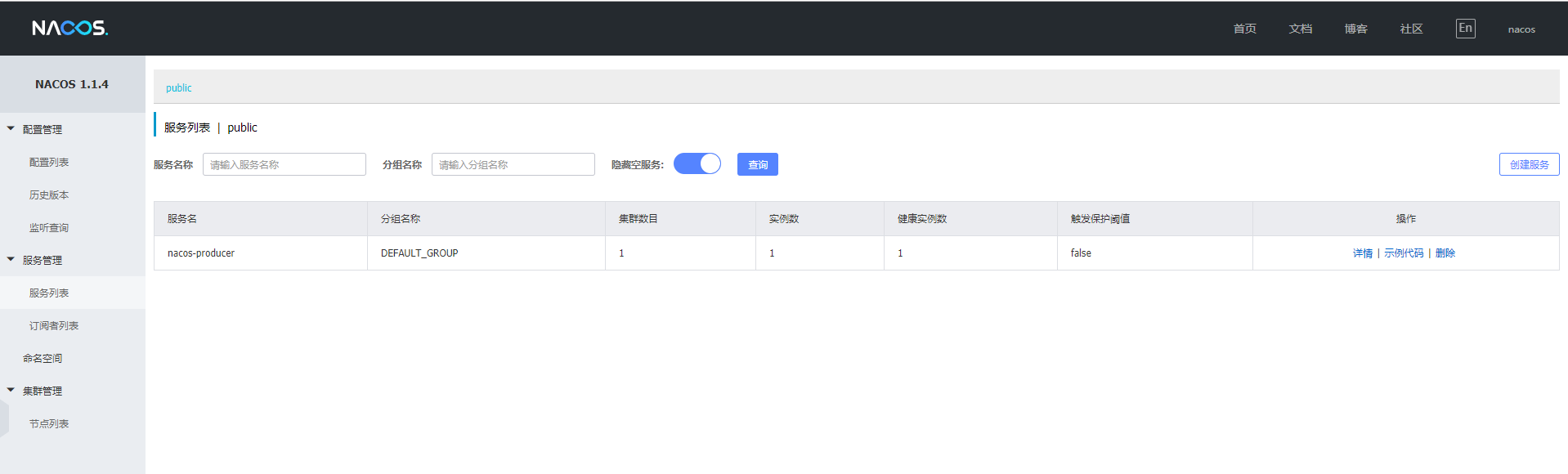
运行程序,打开Nacos管理服务,可以看到nacos-producer已经成功注册。
二、服务发现
基于Alibaba Nacos Spring Cloud(服务发现)、Spring Cloud OpenFeign(声明式调用,同时整合了熔断器、负载均衡),推荐使用此方法。
1、引入依赖
<!-- Nacos服务发现 -->
<dependency>
    <groupId>org.springframework.cloud</groupId>
    <artifactId>spring-cloud-starter-alibaba-nacos-discovery</artifactId>
</dependency>

<!-- 声明式调用 -->
<dependency>
    <groupId>org.springframework.cloud</groupId>
    <artifactId>spring-cloud-starter-openfeign</artifactId>
</dependency>

<!-- 负载均衡 -->
<dependency>
    <groupId>org.springframework.cloud</groupId>
    <artifactId>spring-cloud-starter-netflix-ribbon</artifactId>
</dependency>

<!-- 熔断器 -->
<dependency>
    <groupId>org.springframework.cloud</groupId>
    <artifactId>spring-cloud-starter-netflix-hystrix</artifactId>
</dependency>
2、配置文件配置
在application.yaml配置文件内添加Nacos Server的地址,并开启feign的熔断器功能:
server:
  port: 8081

spring:
  application:
    name: nacos-producer
  cloud:
    nacos:
      discovery:
        server-addr: 127.0.0.1:8848

#允许feign开启熔断器,默认未开启
feign:
  hystrix:
    enabled: true

hystrix:
  command:
    default:
      execution:
        timeout:
          enabled: true
      isolation:
        thread:
          #目前有两个容器实例,单个请求超时5s,+重试>10s,超15s则熔断
          timeoutInMilliseconds: 15000

ribbon:
  #ribbon请求连接的超时时间- 限制3秒内必须请求到服务,并不限制服务处理的返回时间
  connectTimeout: 3000
  #请求处理的超时时间 下级服务响应最大时间,超出时间消费方(路由也是消费方)返回timeout,超时时间不可大于断路器的超时时间
  readTimeout: 5000
3、开启服务发现、负载均衡、熔断器功能
在启动类添加 Spring Cloud 原生注解 @EnableDiscoveryClient ,开启服务注册发现功能,添加 @EnableCircuitBreaker 开始熔断器功能:
@SpringBootApplication
@EnableDiscoveryClient   //开启服务发现
@EnableCircuitBreaker    //开始熔断功能
@EnableFeignClients(basePackages = {"com.sy"})   //开启Feign客户端,并指定扫描范围
@ComponentScan(basePackages = {"com.sy"})
public class NacosDiscoveryExampleApplication {

    public static void main(String[] args) {
        SpringApplication.run(NacosDiscoveryExampleApplication.class, args);
    }
}
4、创建服务代理类
使用@FeignClient注解声明服务调用的代理类,其中参数含义为:
1.name:服务提供者注册在服务注册中心的名称;
2.fallback:使用者提供的断路器实现,必须是当前代理类的实现类;
3.fallbackFactory:使用者提供的Hystrix的断路器工厂类实现。
注:fallback 与 fallbackFactory 只需要配置一个,建议使用fallbackFactory。 示例如下:
@Component
@FeignClient(name = "nacos-producer", fallbackFactory = HystrixClientFallbackFactory.class)
public interface ConsumerService {
    @LoadBalanced
    @GetMapping(value = "/hello")
    String hello();

    @LoadBalanced
    @GetMapping(value = "/hello/{string}")
    String hello(@PathVariable("string") String string);
}
5、创建Hystrix的断路器工厂类
@Component
public class HystrixClientFallbackFactory implements FallbackFactory<ConsumerService> {
    @Override
    public ConsumerService create(Throwable cause) {
        // 打印日志
        LocalLog.info("fallback; reason was: " + cause.getMessage());
        return new ConsumerService() {
            @Override
            public String hello() {
                return "请求失败";
            }

            @Override
            public String hello(String string) {
                return "请求失败. string=" + string;
            }
        };
    }
}
6、通用代理类的实例进行服务调用,与本地调用无异。如下:
@RestController
public class ConsumerController {
    @Autowired
    private ConsumerService consumerService;

    @RequestMapping(value = "/feign/{string}", method = RequestMethod.GET)
    public String echo(@PathVariable String string) {
        return consumerService.hello(string);
    }
}